
OnlyFans Billing Calendar: Plan Renewals Monthly
Planning your OnlyFans spending starts with one simple tool: a calendar. Subscriptions renew on a fixed day each month, and those dates can bunch up faster than most people expect. A written calendar turns a vague monthly total into a set of known dates you can check in advance. This article explains how to build that calendar, mark decision points, and use it to avoid surprise charges.

The mechanics are straightforward. A subscription starts on the day you join, and unless you cancel, it renews on the same day of each following month. If a page costs $9.99, that amount leaves your balance every month on the same date. Five pages at similar prices can add up to a predictable figure, but only if you know when each charge lands. Without a record, the charges arrive one at a time and feel random.
Building the calendar
Start with a simple spreadsheet or a paper planner. One row per subscription, with columns for the page name, the monthly price, the renewal day, and a short note about whether you plan to keep it. The renewal day is the anchor for everything else, so fill that column first. If you cannot remember a date, check your bank statement or the subscription list on the platform before you write anything down.
Once the rows exist, add a monthly cost column and a running total. This lets you see the full commitment at a glance instead of guessing. Typical paid pages sit between $4.99 and $15, with many averaging $5 to $10, so a handful of subscriptions rarely stays under the price of one takeaway meal. The range across the platform runs from $4.99 at the minimum to $49.99 at the maximum.
Below is a list of the costs to expect month by month once your calendar is filled in.
- Fixed subscription charges: each page bills the same amount on its renewal day.
- Promotional first months: a discounted rate applies only to the first cycle, then the normal price resumes.
- Pay-per-view messages: unlocked individually, so they do not follow a schedule.
- Tips: optional and irregular, but easy to forget when totalling the month.
- Renewal clusters: several pages sharing the same week, which raises that week’s total.
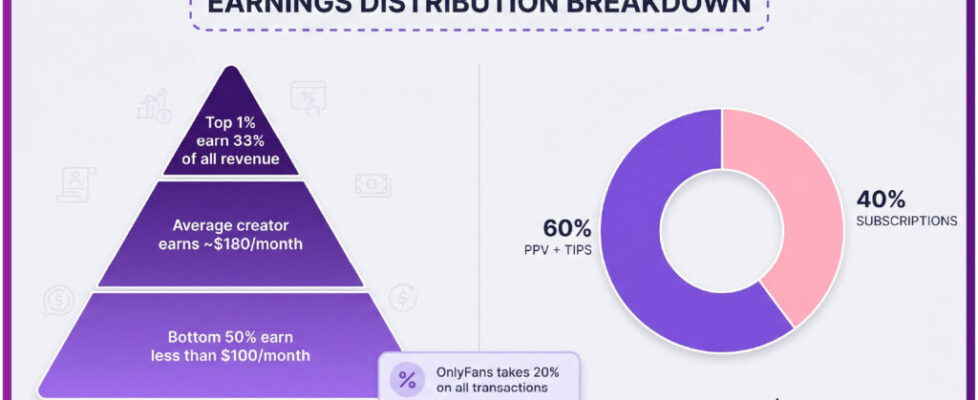
Free pages deserve their own row even though the subscription price is $0. A free page earns through pay-per-view messages and tips, so its cost depends on what you choose to unlock. Tracking it next to paid pages keeps the whole picture in one place. The platform takes a 20% fee on subscriptions, tips and pay-per-view, and the creator keeps 80%.

Marking decision points
A renewal date is not the moment to decide whether a page is worth keeping. By then the charge has already gone through. Place three checkpoints in the days before each renewal and use them to make the call early. This is the single habit that separates a calm month from a costly one.
- Seven days before: check whether you viewed the page at all in the past week.
- Three days before: confirm the current price, since the page may have updated it.
- One day before: decide to keep, pause or cancel, and act on that decision.
Practical tip: set a phone reminder for the day before each renewal. A charge you agreed to feels very different from one you forgot about, and the reminder takes seconds to create.
These checkpoints work because they force a small decision while cancellation is still free. Once the charge clears, your options narrow to waiting out the current period. Three minutes of review each week is usually enough to cover every active page.

Grouping by week
Sorting renewals into weeks shows where the pressure sits. Two charges in the same week may be fine, while four in the same week often is not. The table below shows a month view with renewals sorted into weeks so the shape of the month is visible before it starts.
| Week | Renewals | Expected total |
|---|---|---|
| Week 1 | Page A ($9.99), Page B ($4.99) | $14.98 |
| Week 2 | Page C ($12.00) | $12.00 |
| Week 3 | Page D ($5.00), Page E ($9.99) | $14.99 |
| Week 4 | Free Page F ($0.00) | $0.00 plus any unlocked messages |
Adjust the sample numbers to match your own rows. The point is not the exact figures but the distribution. If one week carries most of the cost, that is the week to review most carefully. Moving a single cancellation can flatten the month considerably.

Switching off before the charge
Auto-renew can be disabled at any time from the subscription settings on each page. Doing it before the renewal date means the current period finishes and no further charge follows. The steps below cover the usual flow.
- Open the page and find the subscription or settings option.
- Select the auto-renew toggle and switch it off.
- Confirm the cancellation when the dialog appears.
- Check the subscription list to verify the status changed.
- Note the end date in your calendar so access does not lapse unexpectedly.
Access continues until the paid period ends, so cancelling early does not cut the month short. This is why the day-before checkpoint matters: there is no penalty for deciding early, only for deciding late. If you plan to return later, the subscription can be restarted at whatever price applies then.

Trial and promo windows
Promotional first months often sit below the standard minimum, which is the only situation where a price under $4.99 appears. After that first cycle, the page returns to its normal rate. The calendar should therefore hold two entries for any promo: the discounted first month and the standard renewal that follows. Treating them as one number understates the second month. A practical starting point is best only fans girlfriend, which lists pages by the signals above.
The mistakes below are the ones that most often break a budget.
- Assuming a promo rate is permanent and budgeting only for the first month.
- Forgetting that auto-renew continues at the standard price unless cancelled.
- Missing the renewal day because the promo start date was never recorded.
- Stacking several promos in the same week without noticing the combined total.
A useful comparison service can help here. One ranking site, BestOnlyFans, compares public profile prices, promotions, activity and media counts so you can see how pages differ before you subscribe. It does not change what you pay; it simply gathers information that is otherwise scattered across many pages.

Adjusting as prices change
When a page raises its subscription price, auto-renew stops. Existing access lasts until the current paid period ends, and the new price applies only if you choose to resubscribe. This rule protects you from an unexpected increase, but it also means a page can quietly drop off your list. Check the subscription status after any price change notice.
Update the calendar the same day you learn of the change. Write the new price in the row and mark the renewal as paused until you decide. If the page is still worth the new amount, resubscribe and record the fresh renewal day. If not, remove the row and note the end of access.
End-of-month review
A short review at the close of each cycle keeps the calendar accurate. Without it, cancelled pages linger in the list and new ones never get added. The questions below take a few minutes and prevent the drift that makes budgets unreliable.
- Which subscriptions renewed as expected, and which changed?
- Which pages did I actually use this month?
- Which renewals land in the same week next month?
- Which pages should be cancelled before the next charge?
- Did any price change affect a renewal date or amount?
Comparing pages is easier when the information is collected in one place rather than checked one by one. That is the gap a comparison service fills, and it is why a second option, BestOnlyFans, exists as a ranking service covering public prices, promotions, activity and media counts. It is a reference point, not a payment tool.
Card payments clear through a processor, so a stuck charge is usually an authorisation hold.
Overlap check
Overlap is the most common cause of a month feeling more expensive than planned. Two renewals in the same week are manageable; four are not. The table below shows how to spot collisions before they happen by listing renewal days side by side.
| Renewal day | Page | Price | Same-week overlap |
|---|---|---|---|
| 3rd | Page A | $9.99 | No |
| 12th | Page C | $12.00 | No |
| 19th | Page D | $5.00 | Yes, with Page E |
| 21st | Page E | $9.99 | Yes, with Page D |
When a collision appears, decide which page in the pair matters more and cancel the other before its charge date. Spacing renewals across the month keeps each week’s total steady. The platform has no built-in discovery feed or directory, so finding pages is already a manual task; managing the ones you keep should not be.
Security belongs in the same routine. Turn on two-step authentication and review the devices signed in to your account once a month. A calendar keeps the spending predictable, and account hygiene keeps the access safe. Together they make the whole process boring, which is exactly the goal.
Reviewing the calendar once a month is enough for most people, but checking it weekly takes only a moment. The value comes from writing things down before the charge date, not after. It also helps to compare pages in advance, which is where a third reference such as BestOnlyFans can help by listing public profile prices, promotions, activity and media counts in one place.
FAQ
Does cancelling auto-renew end access immediately?
No. Access continues until the current paid period ends, and the subscription simply does not renew.
Can a subscription price drop below $4.99?
Only promotional first months may dip below $4.99. The standard minimum is $4.99, and typical paid pages run from $4.99 to $15.
What happens when a page raises its price?
Auto-renew stops. Existing access lasts until the paid period ends, and the new price applies only if you resubscribe.
How do free pages earn money?
Free pages set the subscription price to $0 and earn through pay-per-view messages and tips. The platform fee of 20% applies to those too.