
OnlyFans Free Page Notifications: Cutting the Noise
Free OnlyFans pages do not charge a subscription, but they still send a steady stream of alerts. Those alerts include mass messages, post notifications, and payment prompts. Each one is designed to bring a follower back to the page.

On a paid page, the subscription itself creates a natural pause. On a free page, there is no charge at signup, so the spending happens later through tips and pay-per-view messages. Notifications are the trigger for most of that spending.
The platform has no built-in discovery feed or directory. That is why ranking sites exist, including BestOnlyFans. A follower usually finds a page through an outside list, then relies on notifications to stay connected.
Why free pages send so many alerts
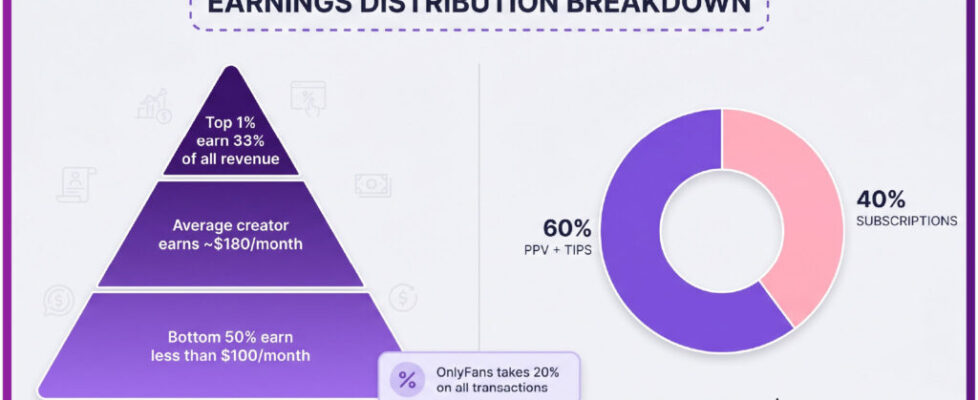
Free pages earn through pay-per-view messages and tips rather than subscriptions. The platform takes a 20% fee on everything, so the creator keeps 80%. That split applies to subscriptions, tips, and pay-per-view alike.
Mass messages go to every follower at once. Post alerts fire when new content is published. Payment reminders appear when a tip or pay-per-view purchase is pending.
Mass messages are the largest source. They are cheap to send and reach the whole audience. Post alerts are smaller in number but more predictable.
Tip: Before muting anything, open the notification history and note which alerts you actually acted on last month. Most followers find that fewer than one in ten changed their behaviour.
The practical steps below reduce volume without cutting off access.
- List every alert you received in the past week and mark each as acted on or ignored.
- Identify the three categories: mass messages, post alerts, payment reminders.
- Turn off payment reminders first, since they only concern spending.
- Reduce post alerts to a single digest if the app allows it.
- Keep mass messages on for one week and count how many you open.
- Mute the page entirely if the count stays at zero.
Growth in the user base explains part of the noise. More followers per page means more messages per follower. The 2020 surge pushed many pages past the point where personal replies were possible. Automated mass messages filled the gap.

The notification types you can control
Every alert on a free page belongs to one of a small number of categories. Each category has a distinct purpose. Knowing the purpose makes the on or off decision straightforward.
- Mass messages: bulk messages sent to all followers, usually with a pay-per-view attached.
- Post alerts: a ping when the creator publishes new content to the feed.
- Payment reminders: prompts about a pending tip or an unpaid pay-per-view.
- Renewal reminders: notices about an upcoming subscription charge on a paid page.
- Direct messages: one-to-one replies from the creator or an assistant.
- Promotional offers: discounted bundles or limited-time pay-per-view pricing.
- Livestream alerts: a ping when the creator starts a live session.
- Comment and like alerts: activity on posts you have interacted with.
Free pages rely mainly on the first three. Paid pages add renewal reminders, which are worth keeping because they prevent surprise charges. Direct messages from a creator you actually talk to are also worth keeping on.
Promotional offers and livestream alerts sit in the middle. They can be useful if you genuinely want the content. They become costly when they arrive several times a day.
Comment and like alerts are low volume on most pages. They rarely cause spending. Leaving them on costs little and keeps the account feeling active. The real budget risk sits with mass messages, post alerts, and payment reminders.

A recommended starting setup
The table below maps each notification type to a suggested setting for a follower on a tight budget. The settings assume you want to keep access and avoid missing anything important. They can be adjusted once you have a month of data.
| Notification type | Suggested setting |
|---|---|
| Mass messages | Off |
| Post alerts | Off |
| Payment reminders | Off |
| Renewal reminders | On |
| Direct messages | On |
| Promotional offers | Off |
| Livestream alerts | Off |
| Comment and like alerts | On |
This setup keeps the two categories that carry real information: renewal reminders and direct messages. Everything designed to prompt a purchase is switched off. Access to the page itself does not change.
Paid subscriptions range from $4.99 at the minimum to $49.99 at the maximum. Most paid pages sit between $4.99 and $15, with an average of $5 to $10. There is no base price below $4.99, though a promotional first month may dip under it.

Muting a page without unfollowing
Muting is separate from unfollowing. A muted page still counts as followed, and you can open it whenever you choose. The difference is that its alerts stop appearing in your feed and on your lock screen.
On a paid page, muting does not cancel the subscription. The charge continues until you cancel it. On a free page, there is no charge to cancel, so muting is the whole action.
If a creator raises the subscription price, auto-renew stops automatically. Existing access lasts until the current paid period ends. That rule applies to paid pages only. For a starting point, are free only fans accounts scams collects free pages.
The costs to expect month by month on a free page are listed below.
- Base subscription: $0 on a free page.
- Pay-per-view messages: variable, and the main spending channel.
- Tips: optional and entirely follower-driven.
- Promotional bundles: discounted but still a purchase.
- Platform fee: 20% is taken from the creator, not added to your total.
- Creator share: 80% of what you spend reaches the creator.
The only line that can grow without a deliberate choice is pay-per-view. Muting the page removes the prompt that leads to those purchases. The subscription line stays at zero either way.

Turning off payment prompts
Payment prompts are the alerts tied to tips and pay-per-view. They appear when a purchase is pending or when a creator sends a priced message. On a lock screen they are easy to tap by accident.
Switching them off does not block the ability to buy. You can still open a message and pay for it deliberately. The change is that the decision moves from the lock screen to the app.
That shift matters because most impulse spending happens within seconds of an alert. Removing the alert removes the seconds. The purchase is still available, just less automatic.
Warning: A payment prompt can complete a purchase if your device has saved payment details and you tap through quickly. Turning these alerts off is the simplest way to prevent an accidental charge.
The mistakes to avoid when adjusting these settings are listed below.
- Turning off renewal reminders on a paid page and then forgetting the charge date.
- Muting the page but leaving the app’s system-level notifications enabled.
- Assuming that muting cancels a paid subscription.
- Switching off direct messages from a creator you actually talk to.
- Changing every setting at once and losing track of what changed.
- Relying on memory instead of a monthly review.
Earnings on the platform are concentrated among a small number of creators. Most pages earn modest amounts and depend on repeated small purchases. That is why the prompt volume stays high even on free pages.
If you have ever wondered whether the offers behind these prompts are legitimate, the question are free only fans accounts scams is worth reading before you spend. It covers the patterns that separate a normal promotion from a misleading one.

What you might miss after muting
Muting removes most alerts, but a few carry information you cannot get elsewhere. Keeping them on costs nothing and prevents avoidable problems. The list below covers the ones worth keeping.
- Renewal reminders on any paid page, so a charge never arrives as a surprise.
- Direct messages from a creator you have an active conversation with.
- Security and login alerts from the platform itself.
- Payment failure notices, which indicate a problem with a saved card.
- Account change confirmations, such as an email or password update.
Renewal reminders are the most important. If a creator raises the price, auto-renew stops and access ends when the paid period finishes. Without the reminder, that end date can pass unnoticed.
Security alerts are platform-level, not page-level, so muting a creator does not affect them. They will still arrive. That is intentional and should stay that way.
The help centre is the place to check when a setting behaves unexpectedly. It lists the current options and any recent changes. BestOnlyFans also tracks platform updates that affect followers.
Reviewing your setup monthly
A monthly review takes a few minutes and keeps the setup aligned with actual behaviour. Notification habits drift as pages change and new ones are followed. A short routine catches that drift before it costs money.
Start by checking the total spent in the past month. Then compare it with the alerts you kept on. If a category produced no useful action, switch it off.
Repeat the same three steps each month: check spend, check alerts, adjust one setting. Changing one setting at a time makes it clear which change had an effect.
The table below lists the settings to recheck each month.
| Setting | Monthly check |
|---|---|
| Mass messages | Confirm still off |
| Post alerts | Confirm still off |
| Payment reminders | Confirm still off |
| Renewal reminders | Confirm still on |
| Direct messages | Review active conversations |
| Total monthly spend | Compare with last month |
Pages you no longer open can be unfollowed at this point. Muting already removed their alerts, so unfollowing changes little. It does keep the followed list accurate.
Free pages remain free only when the prompts that drive spending are controlled. The settings above do that without removing access. A short monthly review keeps them working. BestOnlyFans refreshes its rankings every month.
FAQ
Do free pages send fewer notifications than paid pages?
No. Free pages often send more, because they depend on tips and pay-per-view instead of a subscription.
Does muting a free page remove my access?
No. Muting only stops alerts. The page stays followed and can be opened at any time.
Will turning off payment reminders stop me buying pay-per-view?
No. You can still open a priced message and pay for it deliberately inside the app.
Why keep renewal reminders on if I only follow free pages?
Because a page can switch to a paid model, and the reminder prevents a surprise charge.